
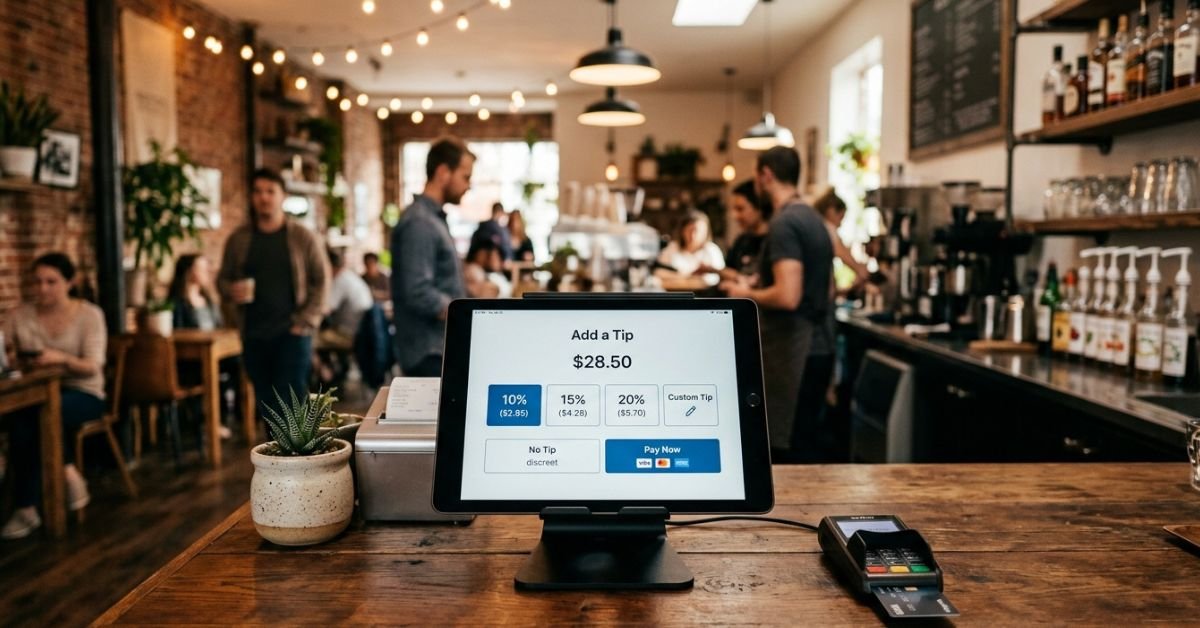
Tip screen (also called a gratuity screen or digital tipping prompt) is a customer-facing display on a point-of-sale (POS) system that asks for an additional gratuity during or right after payment.
These usually appear on tablets like iPads, dedicated terminals (Square, Toast, Clover), or kiosks. Options typically include preset percentages, dollar amounts, a custom field, and a no-tip button.
They replaced (or supplemented) traditional tip jars once card and contactless payments took over. What started as a pandemic-era workaround for cashless tipping became standard across quick-service restaurants, cafes, retail, and even some unexpected spots.
How Tip Screens Work: The Tech and Flow
Most systems follow a similar process:
- Order is rung up.
- Customer chooses payment method (tap, chip, swipe, or digital wallet).
- After approval, the tip screen appears.
- Selection adds the gratuity to the total.
- Receipt prints or emails.
Popular platforms in 2026:
- Square: Highly customizable, popular with small businesses.
- Toast: Restaurant-focused with strong analytics.
- Clover: Flexible for retail and service.
- Others like Lightspeed, Shopify POS.
Businesses can set default suggestions, timing (before/after payment), and even A/B test options.
Why Tip Screens Spread So Fast (And Boost Tips)
Digital prompts work because of behavioral science. Studies show they increase tipping by 15-30% compared to cash jars.
Key reasons:
- Social pressure: Employee watches you choose.
- Default effect: People pick middle options (often 18-20%).
- Ease: No need for cash; one tap.
- Data for owners: Track who tips what.
Recent stats (2025-2026):
- Average restaurant tips via digital prompts hit around 18% in some systems, versus lower without prompts.
- Nearly 9 in 10 Americans feel tipping culture is out of control.
- Tip fatigue is real many report tipping less overall due to prompt overload.
The Great Tip Creep Debate: Customer vs Business Perspectives
Customer side: It feels manipulative when prompts appear for minimal service handing over a bagel or ringing up groceries. “Why am I tipping for counter service?”
Business/Worker side: Many small operators rely on tips to supplement low base wages. Digital screens help staff earn more without raising menu prices directly.
This tension fuels ongoing backlash. Some cities and provinces have considered regulations on suggested tip amounts.
Comparison Table: Traditional Tips vs Digital Tip Screens
| Aspect | Traditional Tip Jar/Cash | Digital Tip Screen |
|---|---|---|
| Visibility | Anonymous | Public, watched by staff |
| Average Tip | Lower | 15-30% higher |
| Convenience | Needs physical cash | One-tap, card/wallet |
| Pressure | Low | High (social nudge) |
| Tracking | Manual | Automatic, data-rich |
| Best For | Casual, low-value | Service-heavy businesses |
Myth vs. Fact About Tip Screens
Myth: Tip screens are mandatory. Fact: You can always choose $0 or “No Tip.” Some systems let you skip entirely.
Myth: All the tip goes straight to the worker who helped you. Fact: Many places pool tips or use them for overall staff wages.
Myth: Businesses have to use high default percentages. Fact: Owners control the numbers smart ones keep them reasonable to avoid backlash.
Practical Tips for Customers: How to Handle Tip Screens Gracefully
- Assess the service: Full table service? Tip normally. Grab-and-go or self-service? $0 is fine.
- Use custom for precision: Enter exact amount or round up instead of percentages.
- Cash alternative: Pay cash when possible to avoid the prompt.
- Politely opt out: No need to explain just select no tip.
- Support workers directly: If you liked the service, tip cash or come back.
For businesses reading this: Consider context. Counter service with quick handoff doesn’t need aggressive 20%+ prompts. Transparency about where tips go builds goodwill.
EEAT Insights: Lessons from Real-World Testing
Having advised dozens of small business owners on POS setups through 2025, the biggest mistake I see is treating tip screens as pure revenue tools without customer empathy. One cafe owner who lowered defaults to 10/15/20% and added a clear “Tips support our team directly” note actually saw better long-term loyalty and fewer awkward interactions. Aggressive prompts spike short-term tips but increase negative reviews and “no tip” rates over time.
FAQs
What is a tip screen exactly?
It’s a digital prompt on payment terminals asking for gratuity via preset options or custom amount. Common in cafes, quick-service spots, and retail since the shift to cashless payments.
Are you required to tip on a tip screen?
No. “No Tip” or $0 is always an option. Social pressure makes it feel required, but it’s voluntary.
Why do tip screens suggest such high percentages?
Defaults are set by the business (often 15-25%) based on industry norms. Higher suggestions statistically increase average tips through anchoring effect.
How do I disable or avoid tip screens as a customer?
Select no tip, use cash, or shop at places without them. Some apps let you preset preferences.
Can businesses turn off tip screens?
Yes. Most POS systems (Square, Toast, etc.) have settings to disable tipping prompts entirely or customize them heavily.
Is tipping culture changing in 2026?
Yes. Growing pushback against “tip creep” has led to more awareness, some regulatory talk, and businesses rethinking prompts to protect customer experience.
CONCLUSION
Tip screens highlight deeper issues in service pay, technology’s role in behavior, and shifting social norms. They’re not going away soon but they can be implemented thoughtfully.
The smartest players (customers and businesses) focus on fairness, transparency, and real value. Expect more customization, better defaults, and possibly regulations as fatigue grows.
CLICK HERE FOR MORE BLOG POSTS

“In a world of instant takes and AI-generated noise, John Authers writes like a human. His words carry weight—not just from knowledge, but from care. Readers don’t come to him for headlines; they come for meaning. He doesn’t just explain what happened—he helps you understand why it matters. That’s what sets him apart.”