
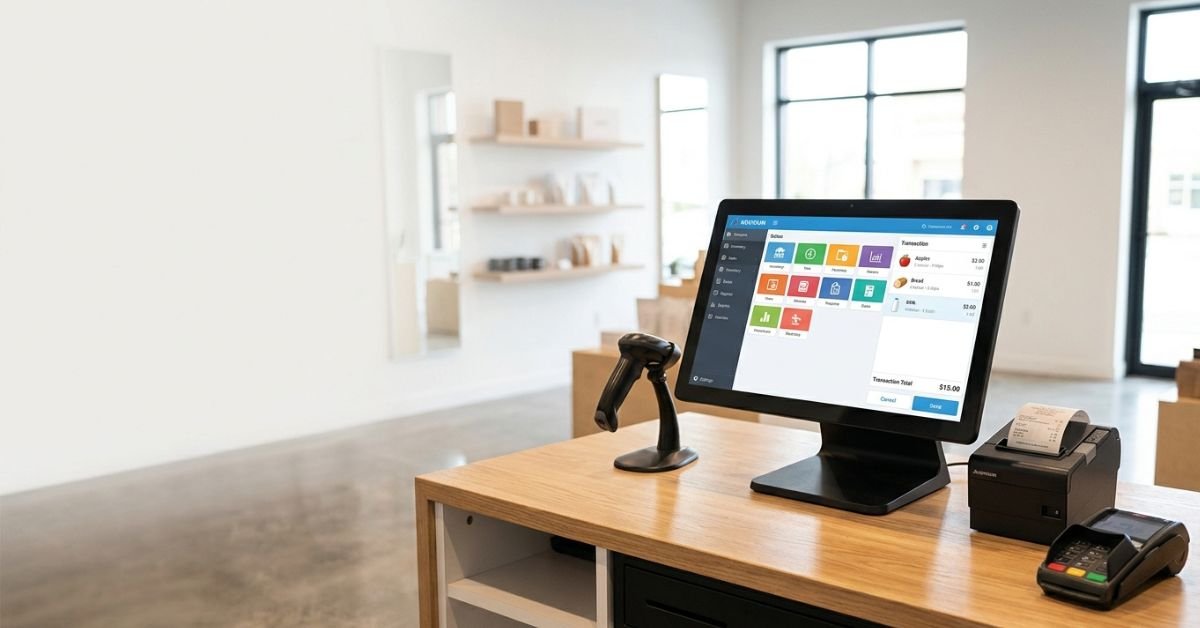
Aronium is a Windows-based point-of-sale application designed primarily for retail stores, supermarkets, cafes, and small service businesses. It turns any standard PC or laptop into a full-featured cash register.
Key Characteristics:
- Native Windows app — Works on Windows 7 through 11 without heavy resource use.
- Offline-first design — No constant internet required (highly valued in areas with unreliable connectivity).
- Freemium model — Fully functional Lite version is free forever; Pro/networking add-ons for growth.
- Customization-heavy — Define your own products, taxes, payment types, receipts, and workflows.
It stands out because it avoids the bloat of many modern SaaS POS tools while still offering barcode support, inventory tracking, customer management, and reporting.
Core Features That Power Daily Operations
Aronium packs practical tools without overwhelming users.
Sales & Checkout:
- Fast product search by name, barcode, or SKU.
- Customizable receipts with logos, headers, footers, and thank-you notes.
- Support for discounts, taxes, multiple payment methods.
- Quick item entry and hold/suspend transactions.
Inventory Management:
- Real-time stock tracking (or near real-time in networked setups).
- Product groups/categories, variants, and history.
- Inventory counts and adjustments.
- Supplier management basics.
Reporting & Insights:
- Sales reports, product performance, and user activity logs.
- Export options for further analysis.
- Customer database for basic CRM and loyalty.
Hardware Compatibility:
- Works with most thermal printers (Epson, Posiflex, etc.), barcode scanners, cash drawers, and touch monitors.
- Multi-user and networking capabilities in paid versions via SQL Server Express.
Additional Perks:
- Multi-language and multi-currency support.
- Add-ons like price lists, e-invoicing.
- Scheduled backups in newer Pro releases.
Aronium Lite vs. Pro: Which Version Do You Need?
| Aspect | Lite (Free) | Pro / Networking |
|---|---|---|
| Single Register | Fully supported | Enhanced performance |
| Multi-User/Cashiers | Limited | Full support |
| Networking | No | Yes (central DB) |
| Advanced Reporting | Basic | More detailed |
| Add-ons & Plugins | Limited | Full access |
| Pricing | Free forever | ~$5–10/month per store |
| Best For | Solo shops, testing | Growing stores, multi-location |
The free version handles most single-register needs exceptionally well. Many users stay on Lite for years.
How to Get Started with Aronium in Minutes
- Download from the official site (aronium.com).
- Run the installer — straightforward Windows process.
- Set up your store basics: taxes, payment types, product groups.
- Add products (import via CSV if needed).
- Connect hardware and test a sale.
- For networking: Follow the dedicated SQL Server setup guide.
Tutorials on YouTube make this even smoother for non-tech users.
Pro Tip from the Trenches: Start with Lite on a dedicated machine. Test for a week with real transactions before considering upgrades. Common early win: customizing receipts to match your brand builds instant professionalism.
Myth vs. Fact About Aronium
- Myth: It’s outdated because it’s Windows-focused. Fact: Native desktop apps often outperform web-based ones in speed and reliability for high-volume counter work. It receives updates into 2026.
- Myth: Free means limited or full of ads. Fact: No ads; core functionality is robust. Paid elements are optional extensions.
- Myth: Only for tiny shops. Fact: Used in 140+ countries with 50K+ monthly active users. Scales via networking.
Real-World Performance & User Feedback (2026)
Retailers praise its simplicity and offline reliability. Ratings hover around 4.6–5.0 across review sites, with high marks for ease of use and value.
Common praise: Lightning-fast checkout, stable even on older hardware, excellent for areas with spotty internet.
Criticisms: Advanced multi-location or cloud syncing is limited compared to pure SaaS options. Some users outgrow it when expanding to multiple physical stores or needing deep analytics.
Industry Veteran Insight: After years observing small retail tech stacks, the biggest mistake is overcomplicating with cloud tools that add latency and fees. Aronium wins for operators who value control over their data and hardware. We’ve seen shops cut monthly software costs dramatically while maintaining (or improving) checkout speed.
Aronium vs. Popular Alternatives
Aronium excels for offline Windows users. Here’s a quick comparison:
- Vs. Square POS: Square is more mobile/cloud-oriented with hardware bundles but higher transaction fees. Aronium is better for pure offline desktop reliability and no-per-transaction costs.
- Vs. Loyverse: Loyverse is mobile-first and free-tier strong, but Aronium feels more robust for traditional counter setups.
- Vs. Shopify POS: Great if you’re already in the Shopify ecosystem; otherwise, Aronium is lighter and cheaper for non-ecommerce-heavy stores.
Choose Aronium if you prioritize low cost, Windows integration, and offline capability. Move to cloud-heavy options for heavy omnichannel needs.
Frequently Asked Questions
Is Aronium completely free? Yes, the Lite version is free indefinitely with no hidden limits on core POS functions. Paid plans unlock networking, advanced features, and add-ons.
Does it work without internet? Absolutely. It’s designed as an offline application, making it ideal for locations with unreliable connectivity. Internet is recommended for updates and optional cloud elements.
What hardware does Aronium support? Most standard retail peripherals: barcode scanners, receipt printers, cash drawers, and touch screens. It plays nicely with Epson and similar brands.
Can multiple cash registers use the same system? Yes, with the networking/Pro version using Microsoft SQL Server Express for a central database.
Is it suitable for restaurants or cafes? It works well for basic table service and quick-service setups, though dedicated restaurant POS might offer more specialized table management.
How secure is customer and sales data? Local control gives you ownership. Use strong Windows security practices and regular backups (now easier with scheduled options).
CONCLUSION
Aronium proves that effective retail tech doesn’t need to be flashy or expensive. It delivers speed, reliability, and essential features that let small businesses focus on customers instead of fighting software. In an era of rising costs and complex tools, its no-nonsense approach remains a smart choice for many.
As retail evolves with AI-assisted inventory and better integrations, expect Aronium to continue refining its Windows foundation while keeping accessibility high. Ready to simplify your operations? Download the free version today and run a few test transactions. Your counter (and bottom line) will thank you.
CLICK HERE FOR MORE BLOG POSTS

“In a world of instant takes and AI-generated noise, John Authers writes like a human. His words carry weight—not just from knowledge, but from care. Readers don’t come to him for headlines; they come for meaning. He doesn’t just explain what happened—he helps you understand why it matters. That’s what sets him apart.”